Red-Trim Tactical Ops Minecraft Skin
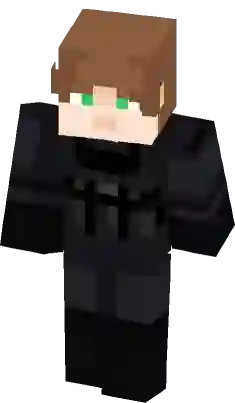
A dark tactical operative Minecraft skin featuring a distinct red-trim utility vest and a white chest emblem. This stealth-focused design includes fingerless gloves, knee pads with crimson accents, and a dual-layered black helmet. Ideal for players looking for a military-style scout look with sharp color contrasts and realistic gear shading.
How to use Minecraft Red-Trim Tactical Ops skin ?
Learn how to download and apply the
Red-Trim Tactical Ops skin for Minecraft on PC (Java Edition) or Pocket Edition (PE).
PC (Java Edition):
- Go to the Minecraft website and login to your account.
- Click the “Minecraft Java Edition” dropdown menu and select “change skin”.
- On the next page, click “select file” and upload the Red-Trim Tactical Ops skin file.
- Open the game app and press the “dressing room” button on the main menu screen.
- Press “Edit Character” -> “owned skins” -> “choose new skin” and upload the Red-Trim Tactical Ops skin file.
Does this skin have thick or skinny arms?
This particular Red-Trim Tactical Ops skin has thick (4px) arms. It is based on the classic Steve model.
What color is this Red-Trim Tactical Ops skin skin?
This particular Minecraft Red-Trim Tactical Ops skin has the following color palette:
White
Black
Woodsmoke
Woodsmoke
Cinder
Similar Skins
Comments
You must be logged in to comment!
No comments yet. be the first to comment.