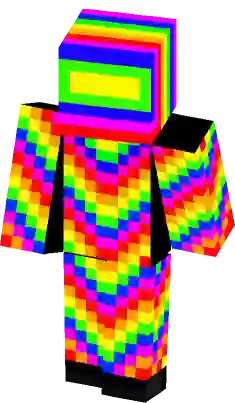
Rainbow Prism Blue Man Minecraft Skin
A vibrant blue Minecraft skin featuring distinct rainbow prism blocks embedded in the chest, face, and legs. This character design uses a deep cobalt base color contrasted with multi-colored pixel patterns including red, yellow, green, and white accents for a glitch or abstract aesthetic. Perfect for players looking for a minimalist but colorful avatar with unique geometric shapes.
How to use Minecraft Rainbow Prism Blue Man skin ?
Learn how to download and apply the
Rainbow Prism Blue Man skin for Minecraft on PC (Java Edition) or Pocket Edition (PE).
PC (Java Edition):
- Go to the Minecraft website and login to your account.
- Click the “Minecraft Java Edition” dropdown menu and select “change skin”.
- On the next page, click “select file” and upload the Rainbow Prism Blue Man skin file.
- Open the game app and press the “dressing room” button on the main menu screen.
- Press “Edit Character” -> “owned skins” -> “choose new skin” and upload the Rainbow Prism Blue Man skin file.
Does this skin have thick or skinny arms?
This particular Rainbow Prism Blue Man skin has thick (4px) arms. It is based on the classic Steve model.
What color is this Rainbow Prism Blue Man skin skin?
This particular Minecraft Rainbow Prism Blue Man skin has the following color palette:
Blue Gem
Dusty Gray
Green Haze
Guardsman Red
Corn
Similar Skins
Comments
You must be logged in to comment!
No comments yet. be the first to comment.