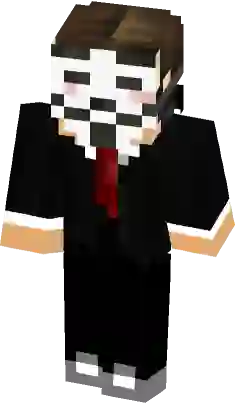
TS Logo Red Mask Boy Minecraft Skin
A dark charcoal suit skin featuring a distinct TS logo on the arm and leg. This character wears a unique maroon red mask with black horn-like patterns over blue eyes, paired with a formal white collared shirt and red necktie. The design includes layered shoulder pads and knee cutouts revealing red fabric underneath.
How to use Minecraft TS Logo Red Mask Boy skin ?
Learn how to download and apply the
TS Logo Red Mask Boy skin for Minecraft on PC (Java Edition) or Pocket Edition (PE).
PC (Java Edition):
- Go to the Minecraft website and login to your account.
- Click the “Minecraft Java Edition” dropdown menu and select “change skin”.
- On the next page, click “select file” and upload the TS Logo Red Mask Boy skin file.
- Open the game app and press the “dressing room” button on the main menu screen.
- Press “Edit Character” -> “owned skins” -> “choose new skin” and upload the TS Logo Red Mask Boy skin file.
Does this skin have thick or skinny arms?
This particular TS Logo Red Mask Boy skin has thick (4px) arms. It is based on the classic Steve model.
What color is this TS Logo Red Mask Boy skin skin?
This particular Minecraft TS Logo Red Mask Boy skin has the following color palette:
Black
Black
Armadillo
Log Cabin
Black
Similar Skins
Comments
You must be logged in to comment!
No comments yet. be the first to comment.